Features
Everything in the app
A print log, your spools, what each print costs and your printers, all on your phone. Free, with no account. Here is what you can do today.
Print log
Your print log, wins and fails
Record each print with the printer and material you used, so you can look it up the next time you print it.
-
Every print in one place
Save the model, the printer, the spool or bottle, the estimated time and the planned material, with your print notes.
-
Status as it happens
Move a print from Estimate or Queued to Printing, Paused, Completed, Failed or Canceled. Completed and failed prints take the material they used off the spool.
-
Learn from failures
Mark a print Failed, record the time and material it used, and note what went wrong. Your success rate stays honest.
-
Photos, video and notes
Add photos and videos to your Gallery, linked to the print, and keep dated notes as you go.
-
Print it again
Start a reprint or copy a print as a new draft. The original keeps its own history.
-
Estimates next to actuals
Keep the slicer's estimate beside the real print time and material used, so your next price is closer.
Filament and resin
Every spool, every gram
Keep each spool of filament and each bottle of resin as its own record, with how much is left.
-
Stock you can trust
Track filament by weight and resin by volume. Every stock change goes into that spool's history, so you can see where it went.
-
Reorder points
Set the amount where a spool counts as running low, and see it flagged before you run out.
-
The details that matter
Brand, color, supplier, lot, what you paid, where it is stored and the empty spool weight.
-
Material families
Group the spools that hold the same filament into a family and see how much you have left across all of them.
-
Scan and label
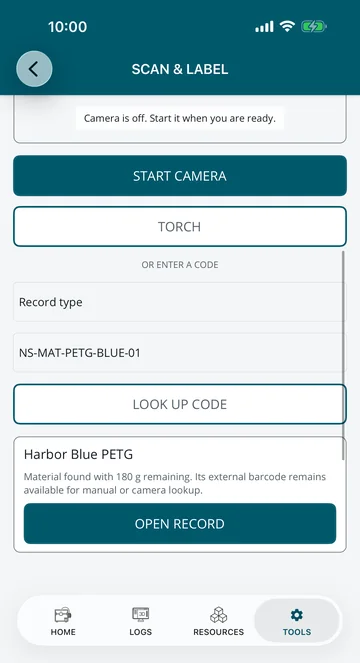
Make QR labels for spools, prints and printers. Scan one with the camera, or type its code, to open the record.
-
Restock and drying reminders
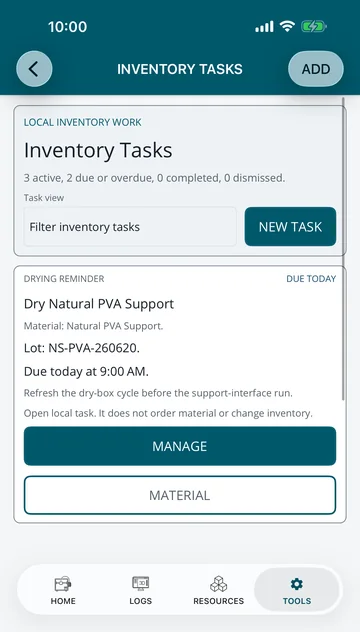
Purchase lists, checks on which batch a spool came from and drying reminders sit next to the material they belong to, and can remind you when they are due.
Cost and pricing
Know what every print costs
The print price calculator adds up what a print really costs you, then helps you decide what to charge.
-
Every cost in one place
Material and waste, print time, electricity, wear on the printer, setup and hands-on labor, post-processing, parts, packaging, shipping and fees.
-
A suggested price
Add your markup, failure risk, minimum charge, rush fee, discount and tax to see a suggested price and the profit it leaves.
-
More than one material
Add support or specialty materials when one print uses more than one spool or bottle.
-
Reuse your setups
Save a cost breakdown and load it again for the prints you make often.
-
PDFs for you or a customer
Export a customer PDF with the price, or an internal PDF with the full breakdown, and save the estimate as a print.
-
Speed estimate
Get a rough print time from a model's volume and your printer's speed, before you slice.
Printers and care
Keep every printer running well
Every printer gets its own record, its own maintenance schedule and, if you want, a connection on your own network.
-
A record for each printer
Name, type, nozzle, temperatures, power draw and location, saved as defaults for new prints and estimates.
-
Printer catalog
Look up printer models in the built-in catalog, separate from the printers you add.
-
Status on your network
Connect Klipper (Moonraker), OctoPrint and PrusaLink printers on your own network to check their status and fill in a printer's details.
-
Commands only when you choose
Connections start read-only. Turn on controls for one printer when you need them, and every command asks you to confirm it first.
-
Maintenance schedules
Set schedules for each printer, log service as you do it and keep its full service history.
-
Work orders and checklists
Plan bigger maintenance as work orders with checklists you can reuse, and see which printers need attention on the fleet board.
Planning and agenda
See what's due today
One list of what needs doing, from the next print to the next restock, so nothing slips.
-
One agenda
Prints, planning, maintenance, restocking, customer follow-ups, invoices and purchase orders in one list, sorted into overdue, today, this week and later.
-
Production planning
Plan batches and time blocks across your printers and spot clashes and late work. Planning only suggests; it never starts a printer.
-
Reminders
Reminders with a due time can send a notification to your phone when that time arrives.
-
A home screen for your workshop
Home shows what needs attention and your recent work, under your own name, title and cover style.
-
A setup checklist
A short checklist in Tools shows the first steps for a new workshop and opens each one for you.
-
Stats and a monthly report
See print hours, success rate, material use and costs, and save a monthly report as a PDF.
Learn and tools
Guides and handy tools, offline
A reference library and the small tools you reach for between prints.
-
Built-in guides
Read about materials, infill patterns and techniques, look up terms in the 3D printing glossary and browse guides. It all works offline.
-
Measure a model
Open an STL or OBJ file to see its size, triangle count, an approximate volume and an estimated weight if printed solid. The file is only read on your phone.
-
OBJ to STL
Convert an OBJ model to an STL file on your phone, then share it.
-
PDFs in one place
Open, save and share PDFs, and find every estimate, invoice and report you've made in your document history.
-
Achievements
Milestones that mark your progress as your workshop grows.
-
Light, dark or your color
Follow your device or choose light or dark, then pick your own accent color.
Backups and privacy
Your records, your files
3DCDesign has no account and no server that holds your records. You decide where copies go.
-
Free backups
Back up your records any time, with or without your Gallery photos and videos. Making, previewing and restoring backups is always free.
-
Saved where you choose
Each backup is kept in the app and opens your share sheet, so you can save a copy wherever you keep files. The app checks a backup file before it restores it.
-
CSV import and export
Bring customers, prints, materials, suppliers and purchases in from a spreadsheet, or export them, with a preview before anything changes.
-
No account
There is no sign-up and no login. Your records live in the app on your phone or tablet.
-
Nothing tracking you
No ads, analytics, tracking or crash reporting in the app. Both app stores list it as collecting no data.
-
Passwords stay on the phone
Printer API keys and passwords are kept in your phone's secure storage and are never put in backups or exports.
When you sell prints
Ready when your hobby turns into a business
Customers, quotes, follow-ups and shop insights are free. Business Premium adds invoices, purchase orders and the other paperwork a print business needs.
Start your print log today
Free on the App Store and Google Play. No account needed.